
Thursday, December 31, 2009
Waving Goodbye to 2009 : Whirled uses Google Wave to say goodbye to 2009.
Whirled uses Google Wave to say goodbye to 2009.
music by: the temper trap
http://www.thetempertrap.net
created by: whirled interactive
http://www.getwhirled.com
discuss 2010
http://discuss2010.com
Source
http://www.youtube.com/watch?v=XyoGbd1iJIw
From the user
Rockyourwhirled
Thursday, December 24, 2009
Happy Holidays from ORKUT :-)
Decorate your tree, hang your stockings and candy canes, prepare your gifts and get ready for Santa Claus to arrive. Christmas time is here and people in countries all over the world are getting into the holiday spirit.

For those who celebrate, it's a great time to gather your family, friends and loved ones and throw a holiday party with tons of food, gifts, and cheer.
There's plenty to do on orkut as well. You can send a holiday-themed scrap to your friends using the Fun Scraps Open Social application or play one of the many games available like Sugar Free Super Hero or 12 days of Christmas.
Whether you're celebrating or not, we hope you have a wonderful day. Happy holidays to you and yours!
Source : http://en.blog.orkut.com/2009/12/happy-holidays.html
Recent posts from other google blogs:
http://googleblog.blogspot.com/2009/12/now-dasher-now-dancer-track-santa-and.html
http://googlerussiablog.blogspot.com/2009/12/google_24.html
http://blog.orkut.com/2009/12/feliz-natal.html
http://googlechinablog.com/2009/12/blog-post_24.html
http://adsense-ru.blogspot.com/2009/12/wwwstanivru.html

For those who celebrate, it's a great time to gather your family, friends and loved ones and throw a holiday party with tons of food, gifts, and cheer.
There's plenty to do on orkut as well. You can send a holiday-themed scrap to your friends using the Fun Scraps Open Social application or play one of the many games available like Sugar Free Super Hero or 12 days of Christmas.
Whether you're celebrating or not, we hope you have a wonderful day. Happy holidays to you and yours!
Source : http://en.blog.orkut.com/2009/12/happy-holidays.html
Recent posts from other google blogs:
http://googleblog.blogspot.com/2009/12/now-dasher-now-dancer-track-santa-and.html
http://googlerussiablog.blogspot.com/2009/12/google_24.html
http://blog.orkut.com/2009/12/feliz-natal.html
http://googlechinablog.com/2009/12/blog-post_24.html
http://adsense-ru.blogspot.com/2009/12/wwwstanivru.html
Gmail Blog : It's been real, 2009
Ah 2009...turning five, finally shedding that beta label, and adding more than 40 new features. As we wind down after a busy year, here's a look back at a handful of our favorite additions to Gmail. We hope you enjoy trying them out as much as we enjoyed building them.

Source : http://gmailblog.blogspot.com/2009/12/its-been-real-2009.html
Recent posts from other google blogs :
http://googlethailand.blogspot.com/2009/12/youtube.html
http://googlekoreablog.blogspot.com/2009/12/blog-post_24.html
http://adwords-ja.blogspot.com/2009/12/google-online-marketing-challenge-2010.html
http://adsense.googlechinablog.com/2009/12/section-target.html
http://googlephotos.blogspot.com/2009/12/looking-sharp-for-holidays.html
- Tasks, onto your phone and out of Labs
- An improved mobile experience, including push Gmail and a complete redesign
- Four new themes to make Gmail sparkle
- Offline Gmail and its graduation from Labs
- Drag and drop labels
- More fast previews, including PowerPoint and TIFF
- Multi-select attachments for faster, smoother file sharing
- A way to eliminate duplicate contacts with a single button
- More storage for less moolah
- Lots of new labs experiments, including undo send, automatic message translation, and "Got the wrong bob?"

Source : http://gmailblog.blogspot.com/2009/12/its-been-real-2009.html
Recent posts from other google blogs :
http://googlethailand.blogspot.com/2009/12/youtube.html
http://googlekoreablog.blogspot.com/2009/12/blog-post_24.html
http://adwords-ja.blogspot.com/2009/12/google-online-marketing-challenge-2010.html
http://adsense.googlechinablog.com/2009/12/section-target.html
http://googlephotos.blogspot.com/2009/12/looking-sharp-for-holidays.html
Saturday, December 19, 2009
Blogger Buzz : Blogger integrates with Amazon Associates
Earlier this year we simplified the process for monetizing your blog by adding a "Monetize" tab in the Blogger app. We started with AdSense, which allows you to add contextual advertising to your pages; more recently we added AdSense for Feeds to help you generate revenue from the distribution of your blog via RSS and Atom. Today we launched a third option: direct integration with Amazon Associates to search Amazon's product catalog and add links to products that earn you commissions when your readers buy products you recommend.
 With this feature, you can search Amazon directly from the Blogger editor and add pictures and links to Amazon products right into your posts. Your readers will earn you commissions whenever they buy the products you recommend, and if you don't already have an Amazon Associates account, you can sign up for one for free without leaving Blogger.
If you've ever written a blog post about a book, recommended a gadget, or reviewed a toy you bought for your kids, you've likely gone through the process of drafting the post, opening up a separate window to go to find a site that sells the product, then going back to Blogger to paste the link to the product into the post editor.
Starting today, you can search the Amazon product catalog without leaving the Blogger interface and insert links to the products you find into your posts. Not only is the process of linking to products more efficient, but Amazon makes it easy for you to earn money whenever your readers actually buy the products you write about. This is known as an "affiliate program", and it's designed to let you recommend products you like to your audience — if they buy the product, you'll earn a commission on that purchase. (For more on affiliate programs in general, here is a good overview at ProBlogger from this summer, and Darren's "11 Lessons Learned" post about Amazon Associates is a good review of how to get the most out of the program.)
To get started, click on the Monetize tab for your blog and click "Amazon Associates". Walk through the setup wizard, and add the Product Finder once you're done.

Now for the fun part: when you are writing a post on Blogger, you'll see an Amazon gadget to the right of your post editor (the "Product Finder"). You can search the Amazon product catalog from within Blogger — type in the name of the product you are writing about, and insert a link to the product, an image of the product, or an iframe containing the image, price details and a "buy it now" button. Every link that's created contains your unique Associates ID, ensuring that Amazon will credit you for any purchases that result from readers clicking the link on your blog.

If you're an existing Amazon Associate, completing this setup simply makes the Product Finder available on Blogger for you — you continue to earn the same referral rate from Amazon. New Associates receive the same referral rate from Amazon that they would have received if they signed up directly. If you're not interested in earning a referral, you can still install the Product Finder: from the "Amazon Associates" page under the Monetize tab, click "I'll do this later — show me more Amazon options" and then click "Add the Product Finder" button.
A quick note about trust: affiliate programs work well when readers trust you. You should avoid promoting products simply because of the referral fee you might earn — readers may lose some of that trust if they sense your posts exist solely to make you money. You may also want to disclose to your readers that you will earn a commission on their purchase — some readers even prefer knowing that you benefit from their business.
There's more information about this integration at Amazon.com, and the Amazon Associates blog has some more details. This integration is the result of months of collaboration between the engineers at both companies, and we're very excited to share the results of this collaboration with you. Happy blogging!
Source :
http://buzz.blogger.com/2009/12/blogger-integrates-with-amazon.html
Recent Posts :
http://en.blog.orkut.com/2009/12/how-to-video-chat-in-orkut.html
http://youtube-global.blogspot.com/2009/12/facebook-feeds-begin-showing-up-on.html
http://gmailblog.blogspot.com/2009/12/one-button-to-merge-all-duplicate.html
http://google-latlong.blogspot.com/2009/12/reflections-on-our-africa-adventures.html
http://googleforstudents.blogspot.com/2009/12/google-docs-celebrates-holidays-with.html
http://google-africa.blogspot.com/2009/12/reflections-on-our-africa-adventures.html
http://google-opensource.blogspot.com/2009/12/london-open-source-jam-15.html
 With this feature, you can search Amazon directly from the Blogger editor and add pictures and links to Amazon products right into your posts. Your readers will earn you commissions whenever they buy the products you recommend, and if you don't already have an Amazon Associates account, you can sign up for one for free without leaving Blogger.
If you've ever written a blog post about a book, recommended a gadget, or reviewed a toy you bought for your kids, you've likely gone through the process of drafting the post, opening up a separate window to go to find a site that sells the product, then going back to Blogger to paste the link to the product into the post editor.
Starting today, you can search the Amazon product catalog without leaving the Blogger interface and insert links to the products you find into your posts. Not only is the process of linking to products more efficient, but Amazon makes it easy for you to earn money whenever your readers actually buy the products you write about. This is known as an "affiliate program", and it's designed to let you recommend products you like to your audience — if they buy the product, you'll earn a commission on that purchase. (For more on affiliate programs in general, here is a good overview at ProBlogger from this summer, and Darren's "11 Lessons Learned" post about Amazon Associates is a good review of how to get the most out of the program.)
To get started, click on the Monetize tab for your blog and click "Amazon Associates". Walk through the setup wizard, and add the Product Finder once you're done.

Now for the fun part: when you are writing a post on Blogger, you'll see an Amazon gadget to the right of your post editor (the "Product Finder"). You can search the Amazon product catalog from within Blogger — type in the name of the product you are writing about, and insert a link to the product, an image of the product, or an iframe containing the image, price details and a "buy it now" button. Every link that's created contains your unique Associates ID, ensuring that Amazon will credit you for any purchases that result from readers clicking the link on your blog.

If you're an existing Amazon Associate, completing this setup simply makes the Product Finder available on Blogger for you — you continue to earn the same referral rate from Amazon. New Associates receive the same referral rate from Amazon that they would have received if they signed up directly. If you're not interested in earning a referral, you can still install the Product Finder: from the "Amazon Associates" page under the Monetize tab, click "I'll do this later — show me more Amazon options" and then click "Add the Product Finder" button.
A quick note about trust: affiliate programs work well when readers trust you. You should avoid promoting products simply because of the referral fee you might earn — readers may lose some of that trust if they sense your posts exist solely to make you money. You may also want to disclose to your readers that you will earn a commission on their purchase — some readers even prefer knowing that you benefit from their business.
There's more information about this integration at Amazon.com, and the Amazon Associates blog has some more details. This integration is the result of months of collaboration between the engineers at both companies, and we're very excited to share the results of this collaboration with you. Happy blogging!
Source :
http://buzz.blogger.com/2009/12/blogger-integrates-with-amazon.html
Recent Posts :
http://en.blog.orkut.com/2009/12/how-to-video-chat-in-orkut.html
http://youtube-global.blogspot.com/2009/12/facebook-feeds-begin-showing-up-on.html
http://gmailblog.blogspot.com/2009/12/one-button-to-merge-all-duplicate.html
http://google-latlong.blogspot.com/2009/12/reflections-on-our-africa-adventures.html
http://googleforstudents.blogspot.com/2009/12/google-docs-celebrates-holidays-with.html
http://google-africa.blogspot.com/2009/12/reflections-on-our-africa-adventures.html
http://google-opensource.blogspot.com/2009/12/london-open-source-jam-15.html
Wednesday, December 16, 2009
New in Gmail : One button to merge all duplicate contacts
Managing a big address book can be a challenge, so it's no surprise that the top request for Google contacts is a fast, easy way to merge duplicate contacts. You've been able to merge contacts one-by-one for a while, but now we've added a single button that merges all your duplicate contacts at once. To clean up your contact list in one fell swoop, just click the "Find duplicates" button in the contact manager, review the merge suggestions (and uncheck any suggestions you don't want merged), and hit the "Merge" button.

If you've been considering getting all your contacts into Gmail or syncing your Gmail contacts to your phone, now's the time to do it. As we've written about previously, you can sync your contacts to a wide variety of devices (including Android, iPhone, Blackberry, SyncML, etc). So if you were dreading spending hours getting your contacts in order, now you can do it with a couple clicks.

Source : http://gmailblog.blogspot.com/2009/12/one-button-to-merge-all-duplicate.html
Recent Posts from Google :
http://ytbizblog.blogspot.com/2009/12/converse-with-your-users-and-all-else_15.html
http://google-opensource.blogspot.com/2009/12/rocking-grid-globus-alliances-second.html
http://adwords-ko.blogspot.com/2009/12/1.html
http://googleforstudents.blogspot.com/2009/12/happy-holidays-from-picasa-team-more.html
http://google-productos-es.blogspot.com/2009/12/comparte-cualquier-pagina-con-la-barra.html

If you've been considering getting all your contacts into Gmail or syncing your Gmail contacts to your phone, now's the time to do it. As we've written about previously, you can sync your contacts to a wide variety of devices (including Android, iPhone, Blackberry, SyncML, etc). So if you were dreading spending hours getting your contacts in order, now you can do it with a couple clicks.

Source : http://gmailblog.blogspot.com/2009/12/one-button-to-merge-all-duplicate.html
Recent Posts from Google :
http://ytbizblog.blogspot.com/2009/12/converse-with-your-users-and-all-else_15.html
http://google-opensource.blogspot.com/2009/12/rocking-grid-globus-alliances-second.html
http://adwords-ko.blogspot.com/2009/12/1.html
http://googleforstudents.blogspot.com/2009/12/happy-holidays-from-picasa-team-more.html
http://google-productos-es.blogspot.com/2009/12/comparte-cualquier-pagina-con-la-barra.html
Tuesday, December 15, 2009
Much Faster, more fun photo sharing on Orkut :-)
You've told us that you really liked the fast photo uploading feature on the new orkut, and we're thrilled! So, recently we turned our focus to revamping your photo viewing experience.
In-line photo browsing
When you receive a photo upload update from a friend in your activity stream, now all you have to do to see the full-sized photo is click on the thumbnail in your update. You can also comment on the photo and see comments by others in your activity stream. This means you can continue checking out other updates without opening a new page.

Using the left and right arrow buttons at the bottom of the photo, you can browse all the photos shared with you. You can also pick a photo you want to see up close by clicking on the 'photo film strip' up top.
Convenient face detection
Clicking the "people in this photo" link at the bottom left of a photo highlights all of the faces that orkut has automatically detected with rectangles. Just click on a rectangle to tag a face by typing a name in the pop-up box. You can also hide the rectangles with a single click.

Photo slideshows
Notice the "slideshow" icon at the bottom right of the full view of the photo? Click on it and sit back for a full-screen, automated slideshow of the photo album. You can stop the show at any time or hover over the thumbnail strip at the bottom of the slideshow to enlarge a particular image. You can also jump ahead to an interesting photo, or go back to one you want to view again. Try playing around with some of the keyboard controls (like Home, End, left and right arrows, Spacebar, and Escape), to see what happens.

Note: we're still working on a version of this feature for Internet Explorer, so if you'd like to check it out now, just sign in to orkut using either Google Chrome or Firefox.
You can enjoy many of these same features not just in the "friends updates" section on your orkut homepage but also from the "profile" and "photos" pages.
We hope you enjoy the new photo viewing, commenting and tagging experience -- and please keep telling us what you think at the orkut help forum or official community.
Original Source : http://en.blog.orkut.com/2009/12/faster-more-fun-photo-sharing-on-orkut.html
Recent Posts from Google :
http://googleblog.blogspot.com/2009/12/live-on-youtube-leaders-answer-your.html
http://gmailblog.blogspot.com/2009/12/new-in-labs-mark-unread-from-here.html
http://googlephotos.blogspot.com/2009/12/picasa-36-now-with-collaborative-albums.html
In-line photo browsing
When you receive a photo upload update from a friend in your activity stream, now all you have to do to see the full-sized photo is click on the thumbnail in your update. You can also comment on the photo and see comments by others in your activity stream. This means you can continue checking out other updates without opening a new page.

Using the left and right arrow buttons at the bottom of the photo, you can browse all the photos shared with you. You can also pick a photo you want to see up close by clicking on the 'photo film strip' up top.
Convenient face detection
Clicking the "people in this photo" link at the bottom left of a photo highlights all of the faces that orkut has automatically detected with rectangles. Just click on a rectangle to tag a face by typing a name in the pop-up box. You can also hide the rectangles with a single click.

Photo slideshows
Notice the "slideshow" icon
at the bottom right of the full view of the photo? Click on it and sit back for a full-screen, automated slideshow of the photo album. You can stop the show at any time or hover over the thumbnail strip at the bottom of the slideshow to enlarge a particular image. You can also jump ahead to an interesting photo, or go back to one you want to view again. Try playing around with some of the keyboard controls (like Home, End, left and right arrows, Spacebar, and Escape), to see what happens.
Note: we're still working on a version of this feature for Internet Explorer, so if you'd like to check it out now, just sign in to orkut using either Google Chrome or Firefox.
You can enjoy many of these same features not just in the "friends updates" section on your orkut homepage but also from the "profile" and "photos" pages.
We hope you enjoy the new photo viewing, commenting and tagging experience -- and please keep telling us what you think at the orkut help forum or official community.
Original Source : http://en.blog.orkut.com/2009/12/faster-more-fun-photo-sharing-on-orkut.html
Recent Posts from Google :
http://googleblog.blogspot.com/2009/12/live-on-youtube-leaders-answer-your.html
http://gmailblog.blogspot.com/2009/12/new-in-labs-mark-unread-from-here.html
http://googlephotos.blogspot.com/2009/12/picasa-36-now-with-collaborative-albums.html
New in GMail Labs: Mark unread from here
I subscribe to a lot of really active mailing lists. Oftentimes, an email in my inbox will get dozens of replies before I get a chance to start reading it. If I only have a few moments to look at a particularly long and interesting discussion, I'd like to start reading it then; later, when I have some more time, I'll pick up where I left off. However, if I mark the thread as unread, it will return to its previously read state without updating to show what I just read. When I come back to it, I'll have to search for the last thing I remember reading. If I star the first message I still want to read instead, I might not remember that it needs to be read when I'm in my inbox later (and when I do read it, I'll have to expand lots of messages before I can read the conversation properly).
There's a new feature in Gmail Labs that will help with this. When you enable Mark Unread From Here from the Labs tab under Settings, you'll see a new "Mark unread from here" option in the drop down menu found in the upper right-hand corner of messages.

Clicking this option on a message tells Gmail that you want that message to be the first one you see when you reopen the thread later, with all messages after it open for easy reading. So, when you leave partway through reading a long thread, figuring out where to start reading again is easy. Give it a try and share your thoughts.
Original Source :
http://gmailblog.blogspot.com/2009/12/new-in-labs-mark-unread-from-here.html
Recent Posts :
http://google-cz.blogspot.com/2009/12/nahlasovani-placenych-odkazu.html
http://it-adsense.blogspot.com/2009/12/nota-su-una-modifica-introdotta-nella.html
http://youtube-global.blogspot.com/2009/12/live-on-youtube-leaders-answer-your.html
http://blog.chromium.org/2009/12/security-in-depth-extension-system.html
http://googlejapan.blogspot.com/2009/12/internet-explorer.html
There's a new feature in Gmail Labs that will help with this. When you enable Mark Unread From Here from the Labs tab under Settings, you'll see a new "Mark unread from here" option in the drop down menu found in the upper right-hand corner of messages.

Clicking this option on a message tells Gmail that you want that message to be the first one you see when you reopen the thread later, with all messages after it open for easy reading. So, when you leave partway through reading a long thread, figuring out where to start reading again is easy. Give it a try and share your thoughts.
Original Source :
http://gmailblog.blogspot.com/2009/12/new-in-labs-mark-unread-from-here.html
Recent Posts :
http://google-cz.blogspot.com/2009/12/nahlasovani-placenych-odkazu.html
http://it-adsense.blogspot.com/2009/12/nota-su-una-modifica-introdotta-nella.html
http://youtube-global.blogspot.com/2009/12/live-on-youtube-leaders-answer-your.html
http://blog.chromium.org/2009/12/security-in-depth-extension-system.html
http://googlejapan.blogspot.com/2009/12/internet-explorer.html
Thursday, December 10, 2009
Happy holidays from Google Chrome : Mac, Linux and extensions in beta
There was nothing more excruciating for me as a kid than seeing the presents pile up under the Christmas tree but knowing that I couldn't open them until Christmas morning. On the Google Chrome team, we've had the same feeling as we've been working to get betas ready for Mac, Linux and extensions. It's been a long time coming, but today we can check the top three items off our users' wish lists.
Google Chrome for Mac (Beta)
We've been working hard to deliver a first-class browser for the Mac — it took longer than we expected, but we hope the wait was worth it! We wanted Google Chrome to feel at home on the Mac, so we've focused on uniting our clean, simple design with subtle animations and effects to create a snappy and satisfying browsing experience on OS X. As you might expect, the speed of Google Chrome for Mac is something we're very proud of. If you have a Mac, try installing the beta and see how fast it launches — there's hardly even time for the icon in the dock to bounce!
Google Chrome for Linux (Beta)
At Google, most engineers use Linux machines, so we certainly heard loud and clear how much they wanted Google Chrome for Linux. Just like Google Chrome for Windows and Mac, we focused on speed, stability and security, but we also wanted a high-performance browser that integrated well with the Linux ecosystem. This includes tight integration with native GTK themes, updates that are managed by the standard system package manager, and many other features that fit in natively with the operating system where possible.
 Google Chrome for Linux in various GTK themes
Just as important, we've had quite a bit of help from the open source community. More than 50 open source contributors have worked on Chromium and they've been especially helpful on delivering our Linux version of Google Chrome. For more details on the beta release of Google Chrome for Linux, check out the Chromium blog.
Extensions in Google Chrome for Windows and Linux (Beta)
When we first launched Google Chrome in September 2008, we knew that we wanted to make it easy for you to customize the browser with extensions. We also wanted to make extensions easy to create and maintain, while preserving Google Chrome's speed and stability. Extensions on Google Chrome accomplishes all these goals: they are as easy to create as web pages, easy to install, and each extension runs in its own process to avoid crashing or significantly slowing down the browser.
 Extensions installed on Google Chrome (for PC or Linux)
If you're on a PC or a Linux machine, you can check out more than 300 extensions in the gallery, including a few cool, useful and cute extensions . Extensions aren't quite beta-quality on Mac yet, but you will be able to preview them on a developer channel soon. And if you're a web developer, you can learn more about writing extensions for Google Chrome on the Chromium blog.
We hope the betas for Mac, Linux and extensions were some of the things on your wish list this year. We'd like to say thanks to Mac and Linux users who gave our early developer versions of Google Chrome a test drive on these platforms, as well as developers who wrote great extensions for Google Chrome. And in case you're wondering what we'd like for the holidays, we're always eager for feedback — and I wouldn't mind a brand new extension that makes it snow on demand!
Source :
http://chrome.blogspot.com/2009/12/google-chrome-for-holidays-mac-linux.html
More Recent Posts :
http://googleblog.blogspot.com/2009/12/pbs-newshour-comes-to-youtube.html
http://youtube-global.blogspot.com/2009/12/2009-year-in-spotlights.html
http://gmailblog.blogspot.com/2009/12/offline-gmail-graduates-from-labs.html
http://google-au.blogspot.com/2009/12/coast-to-coast-more-australian.html
http://googlekoreablog.blogspot.com/2009/12/blog-post_8166.html
http://googlechinablog.com/2009/12/09-2009.html
Google Chrome for Mac (Beta)
We've been working hard to deliver a first-class browser for the Mac — it took longer than we expected, but we hope the wait was worth it! We wanted Google Chrome to feel at home on the Mac, so we've focused on uniting our clean, simple design with subtle animations and effects to create a snappy and satisfying browsing experience on OS X. As you might expect, the speed of Google Chrome for Mac is something we're very proud of. If you have a Mac, try installing the beta and see how fast it launches — there's hardly even time for the icon in the dock to bounce!
Google Chrome for Linux (Beta)
At Google, most engineers use Linux machines, so we certainly heard loud and clear how much they wanted Google Chrome for Linux. Just like Google Chrome for Windows and Mac, we focused on speed, stability and security, but we also wanted a high-performance browser that integrated well with the Linux ecosystem. This includes tight integration with native GTK themes, updates that are managed by the standard system package manager, and many other features that fit in natively with the operating system where possible.
 Google Chrome for Linux in various GTK themes
Just as important, we've had quite a bit of help from the open source community. More than 50 open source contributors have worked on Chromium and they've been especially helpful on delivering our Linux version of Google Chrome. For more details on the beta release of Google Chrome for Linux, check out the Chromium blog.
Extensions in Google Chrome for Windows and Linux (Beta)
When we first launched Google Chrome in September 2008, we knew that we wanted to make it easy for you to customize the browser with extensions. We also wanted to make extensions easy to create and maintain, while preserving Google Chrome's speed and stability. Extensions on Google Chrome accomplishes all these goals: they are as easy to create as web pages, easy to install, and each extension runs in its own process to avoid crashing or significantly slowing down the browser.
 Extensions installed on Google Chrome (for PC or Linux)
If you're on a PC or a Linux machine, you can check out more than 300 extensions in the gallery, including a few cool, useful and cute extensions . Extensions aren't quite beta-quality on Mac yet, but you will be able to preview them on a developer channel soon. And if you're a web developer, you can learn more about writing extensions for Google Chrome on the Chromium blog.
We hope the betas for Mac, Linux and extensions were some of the things on your wish list this year. We'd like to say thanks to Mac and Linux users who gave our early developer versions of Google Chrome a test drive on these platforms, as well as developers who wrote great extensions for Google Chrome. And in case you're wondering what we'd like for the holidays, we're always eager for feedback — and I wouldn't mind a brand new extension that makes it snow on demand!
Source :
http://chrome.blogspot.com/2009/12/google-chrome-for-holidays-mac-linux.html
More Recent Posts :
http://googleblog.blogspot.com/2009/12/pbs-newshour-comes-to-youtube.html
http://youtube-global.blogspot.com/2009/12/2009-year-in-spotlights.html
http://gmailblog.blogspot.com/2009/12/offline-gmail-graduates-from-labs.html
http://google-au.blogspot.com/2009/12/coast-to-coast-more-australian.html
http://googlekoreablog.blogspot.com/2009/12/blog-post_8166.html
http://googlechinablog.com/2009/12/09-2009.html
One click Blogging with BlogThis! Chrome Extension
More and more of you are using Google Chrome (more than 30 million active users now!), and we want to let you know that a Blogger extension is included in the Chrome Extensions gallery. The BlogThis! Chrome extension is available now, one of several hundred extensions to be found in the Chrome extensions gallery.
Using the BlogThis! Chrome extension, you can start writing a blog post in one click. Whenever you are inspired by a web page you are looking at and want to blog about it, just click on the BlogThis! button on your Chrome toolbar, and the Blogger post editor opens up with a pre-populated link to the web page you were on. If you want to include any text in your post, simply highlight it before clicking on the BlogThis! button. Edit the post as you'd like, and publish it instantly or save it as a draft for future posting.

To try out the BlogThis! Chrome extension, first switch to Google Chrome BETA (if you are not already on that version), and install the BlogThis! extension by clicking on "Extensions" on your browser toolbar or visiting the BlogThis! extension homepage. Note: Extensions are only available for Chrome on the PC and Linux; Extension support on Chrome for Mac is under development.
Source : http://buzz.blogger.com/2009/12/one-click-blogging-with-blogthis-chrome.html
Using the BlogThis! Chrome extension, you can start writing a blog post in one click. Whenever you are inspired by a web page you are looking at and want to blog about it, just click on the BlogThis! button on your Chrome toolbar, and the Blogger post editor opens up with a pre-populated link to the web page you were on. If you want to include any text in your post, simply highlight it before clicking on the BlogThis! button. Edit the post as you'd like, and publish it instantly or save it as a draft for future posting.
To try out the BlogThis! Chrome extension, first switch to Google Chrome BETA (if you are not already on that version), and install the BlogThis! extension by clicking on "Extensions" on your browser toolbar or visiting the BlogThis! extension homepage. Note: Extensions are only available for Chrome on the PC and Linux; Extension support on Chrome for Mac is under development.
Source : http://buzz.blogger.com/2009/12/one-click-blogging-with-blogthis-chrome.html
Wednesday, December 9, 2009
So now you can wave with Google Groups

Some users have noticed that we have the beginnings of support for groups in Google Wave, so we figured we'd give everyone a quick explanation of how it currently works. Keep in mind that this is in the very early stages and we have much better functionality planned for the future, but feel free to try it out!
Currently, you can add a Google Group to a wave, set permissions and then view and edit waves with that group. Unlike other group conversations, however, group waves will only show up in Google Wave, not in the Google Groups interface.
Here are the detailed steps for how to do it:
Step 1: Create a Google Group
When creating a group, note that most of the settings of Google Groups are respected; for instance, if the group is set to allow anyone to view content, anyone may view that wave. You will have to add Google Wave users into your group with their username@gmail.com address (we're in the process of getting username@googlewave.com working, too). Under the 'Appearance' setting, chose an image that will help you identify your group in Google Wave. Learn more about how groups settings work with Google Wave.
If you already have a Google Group, you're ready to go.
Step 2: Add your new group into your contact list
Click the '+' button in the lower right corner of the contacts panel, type in the name of the group (including @googlegroups.com) and hit 'Submit'.

Step 3: Add the group to a wave
This works just like any of your other contacts.
Step 4: Find waves with your group
You can do this either by clicking on the group's contact and then on the "Group Waves" button or by searching for "group:groupname@googlegroups.com". If you'd like to create a quick shortcut to get to these, try saving your search! Find information on more group searches in our Help Center.

Step 5: Follow group waves!
We recently launched the ability to follow waves. You will not be automatically following group waves, so use the follow feature to make them appear in your inbox when they're updated.
This is just the beginning for groups. In the future, you'll have a groups option in your Navigation panel that will help you find and follow group waves. We'd love to hear your thoughts, let us know what you think on our Help Forum.
Source :
http://googlewave.blogspot.com/2009/12/waving-with-groups.html
Recent Posts :
http://googleblog.blogspot.com/2009/12/join-this-group-google-groups-joins.html
http://chrome.blogspot.com/2009/12/google-chrome-for-holidays-mac-linux.html
http://youtube-global.blogspot.com/2009/12/webinar-on-basic-editing-techniques-dec.html
http://gmailblog.blogspot.com/2009/12/offline-gmail-graduates-from-labs.html
http://googlechinablog.com/2009/12/09_09.html
http://googleblog.blogspot.com/2009/12/faster-apps-for-faster-web-introducing.html
http://googleenterprise.blogspot.com/2009/12/communication-and-collaboration-just.html
Tuesday, December 8, 2009
Gmail Blog Updates [Offline Gmail graduates from Labs | Happy holidays from the Picasa team]
Offline Gmail graduates from Labs
Almost a year ago, we launched Offline Gmail in Gmail Labs. By installing Offline Gmail, you're able to use the normal Gmail interface to read and write mail, search, and organize, even when there's no internet connection. And Flaky Connection mode speeds up Gmail when your connection is slow or unreliable.
Since we first launched in Labs, we've heard from a lot of you who tried Offline Gmail, and your feedback helped us make a lot of improvements. Aside from fixing bugs and making the whole offline experience smoother, we recently added two frequently requested features: an option to choose which messages get downloaded for offline use and the ability to send attachments while offline. Offline Gmail has proven particularly useful for business and schools making the switch to Google Apps from traditional desktop mail clients -- they're used to being able to access their mail whether or not they're online, and Offline Gmail brings this functionality right to the browser.
Now, we're happy to announce that Offline Gmail is graduating from Labs and becoming a regular part of Gmail. If you're already using it, then you're all set. While you'll no longer see it on the Labs tab, you can tweak your settings and turn it on and off from the Offline tab under Settings. If you'd like to get started with Offline Gmail on your computer now, here's how:
- Click the "Settings" link in the top-right corner of Gmail.
- Click the "Offline" tab.
- Select "Enable Offline Mail for this computer."
- Click "Save Changes" and follow the directions from there.
Thanks for all of the feedback over the last year -- and for putting up with the occasional bug or two. We're going to have a little toast, and then get right back to working on more improvements for 2010.
P.S. We received some interesting pictures in response to our call for photos of people using Gmail offline in our last post. Our favorite so far came from Ugo, who is at a Saharawirefugee camp in south Algeria, where he uses Gmail offline most of the time and connects via a satellite phone to our servers just once a day.

Three weeks ago we made extra storage for Gmail and Picasa Web Albums more affordable, and now we've partnered with Eye-Fi to make it even easier to get your photos into the cloud. Eye-Fi offers WiFi-enabled memory cards which make your existing camera wireless, so it's easy to upload photos and videos right to Picasa Web Albums or to your computer -- no cables required. For a limited time, when you buy 200 GB of Google paid storage for $50, you'll get a free Eye-Fi card (a $95 value).
Visit picasa.google.com/eyefi.html to get yours today, and happy holidays from the Picasa team!

Source :
Recent Posts :
Since we first launched in Labs, we've heard from a lot of you who tried Offline Gmail, and your feedback helped us make a lot of improvements. Aside from fixing bugs and making the whole offline experience smoother, we recently added two frequently requested features: an option to choose which messages get downloaded for offline use and the ability to send attachments while offline. Offline Gmail has proven particularly useful for business and schools making the switch to Google Apps from traditional desktop mail clients -- they're used to being able to access their mail whether or not they're online, and Offline Gmail brings this functionality right to the browser.
Now, we're happy to announce that Offline Gmail is graduating from Labs and becoming a regular part of Gmail. If you're already using it, then you're all set. While you'll no longer see it on the Labs tab, you can tweak your settings and turn it on and off from the Offline tab under Settings. If you'd like to get started with Offline Gmail on your computer now, here's how:
- Click the "Settings" link in the top-right corner of Gmail.
- Click the "Offline" tab.
- Select "Enable Offline Mail for this computer."
- Click "Save Changes" and follow the directions from there.
Thanks for all of the feedback over the last year -- and for putting up with the occasional bug or two. We're going to have a little toast, and then get right back to working on more improvements for 2010.
P.S. We received some interesting pictures in response to our call for photos of people using Gmail offline in our last post. Our favorite so far came from Ugo, who is at a Saharawirefugee camp in south Algeria, where he uses Gmail offline most of the time and connects via a satellite phone to our servers just once a day.

Three weeks ago we made extra storage for Gmail and Picasa Web Albums more affordable, and now we've partnered with Eye-Fi to make it even easier to get your photos into the cloud. Eye-Fi offers WiFi-enabled memory cards which make your existing camera wireless, so it's easy to upload photos and videos right to Picasa Web Albums or to your computer -- no cables required. For a limited time, when you buy 200 GB of Google paid storage for $50, you'll get a free Eye-Fi card (a $95 value).
Visit picasa.google.com/eyefi.html to get yours today, and happy holidays from the Picasa team!
Visit picasa.google.com/eyefi.html to get yours today, and happy holidays from the Picasa team!

Source :
Recent Posts :
Monday, December 7, 2009
Google launches Online dictionary
San Francisco: Google has launched an online dictionary which will offer meaning of words in two dozen languages. A visit to a Google Dictionary service at google.com/dictionary showed a clean, simple Web page with a box for selecting languages from a drop-down list and a second box for typing in words to be defined, according to Economic Times.

The dictionary service offered definitions of words in 28 languages and to translate terms from or into English.Although Google's attempt to compete with Wikipedia via its Knol offering has been a remarkably dismal failure for a company that tends to get things right, this is a tool that could displace plenty of other properties like dictionary.com and answers.com. Not only does it provide a really uncluttered interface, but the extensive translation tools are quite useful. While Google Translate is useful for passages or entire sites, often ELL students simply need to clarify a single word; Google Dictionary fills the bill, report The Register.
Better yet, for those of us who have adopted Google Apps, users can star words and definitions and store them in their Google accounts for reference. While this seems a small thing, like most things Google, it may lend itself to sharing and classroom use in the future as the company expands this offering.
Source : www.siliconindia.com
The dictionary service offered definitions of words in 28 languages and to translate terms from or into English.Although Google's attempt to compete with Wikipedia via its Knol offering has been a remarkably dismal failure for a company that tends to get things right, this is a tool that could displace plenty of other properties like dictionary.com and answers.com. Not only does it provide a really uncluttered interface, but the extensive translation tools are quite useful. While Google Translate is useful for passages or entire sites, often ELL students simply need to clarify a single word; Google Dictionary fills the bill, report The Register.
Better yet, for those of us who have adopted Google Apps, users can star words and definitions and store them in their Google accounts for reference. While this seems a small thing, like most things Google, it may lend itself to sharing and classroom use in the future as the company expands this offering.
Source : www.siliconindia.com
Friday, December 4, 2009
Integrated Search results from Google
Today, we're excited to introduce a new "Translated search" tool in the Search Options panelthat makes finding and reading content written in other languages easier. Translated search is great because it helps you find information from sites written in other languages. We've offered this feature in Google Translate for a while, but now we're integrating it fully into Google search, making it easier for you to find and read results from pages across the web, even if they weren't written in a language you speak.
Now, when you search on Google for something in your own language, you can use this tool to search the web in another language. Click "Show Options" at the top of the search results page and select "Translated search" to try it out. We'll algorithmically select the best language(s) to translate your search query into and then return you translated results from those pages. We'll even display results from multiple languages.
For example, if you search for [restaurant reviews antwerp] while on vacation in Belgium and want to find more reviews or review sites beyond those that are just available in English, select "Translate search" in the "Show Options" panel. We'll automatically select French and Dutch (the languages spoken in Belgium), translate your query into these languages and then translate the results back into English for you to read. If you'd like to search specific languages, just modify the languages in the panel above the results. You can display results for up to five languages at once and select from 51 languages to search.

Of course, the algorithm that determines which languages to translate your search query into isn't perfect, but we're working to improve it.
We're rolling this out over the next day — keep an eye out. So if you're traveling and want to find hotels, restaurants, activities or reviews written from a local perspective, or if you're just curious to find what's being written about a company, product or topic in another language, give Translated search in the Search Options panel a try. Searching the global web has never been easier!
Source / Related Links / Recent Posts :
http://googleblog.blogspot.com/2007/05/universal-search-best-answer-is-still.html
http://googleblog.blogspot.com/2007/05/search-without-boundaries.html
http://googleblog.blogspot.com/2009/05/more-search-options-and-other-updates.html
http://googleblog.blogspot.com/2009/12/searching-global-web-just-got-little.html
http://gmailblog.blogspot.com/2009/12/spread-some-holiday-cheer-one-card-at.html
http://googlechromereleases.blogspot.com/2009/12/dev-channel-update.html
http://en.blog.orkut.com/2009/12/have-you-gotten-invites-to-new-orkut.html
Now, when you search on Google for something in your own language, you can use this tool to search the web in another language. Click "Show Options" at the top of the search results page and select "Translated search" to try it out. We'll algorithmically select the best language(s) to translate your search query into and then return you translated results from those pages. We'll even display results from multiple languages.
For example, if you search for [restaurant reviews antwerp] while on vacation in Belgium and want to find more reviews or review sites beyond those that are just available in English, select "Translate search" in the "Show Options" panel. We'll automatically select French and Dutch (the languages spoken in Belgium), translate your query into these languages and then translate the results back into English for you to read. If you'd like to search specific languages, just modify the languages in the panel above the results. You can display results for up to five languages at once and select from 51 languages to search.

Of course, the algorithm that determines which languages to translate your search query into isn't perfect, but we're working to improve it.
We're rolling this out over the next day — keep an eye out. So if you're traveling and want to find hotels, restaurants, activities or reviews written from a local perspective, or if you're just curious to find what's being written about a company, product or topic in another language, give Translated search in the Search Options panel a try. Searching the global web has never been easier!
Source / Related Links / Recent Posts :
http://googleblog.blogspot.com/2007/05/universal-search-best-answer-is-still.html
http://googleblog.blogspot.com/2007/05/search-without-boundaries.html
http://googleblog.blogspot.com/2009/05/more-search-options-and-other-updates.html
http://googleblog.blogspot.com/2009/12/searching-global-web-just-got-little.html
http://gmailblog.blogspot.com/2009/12/spread-some-holiday-cheer-one-card-at.html
http://googlechromereleases.blogspot.com/2009/12/dev-channel-update.html
http://en.blog.orkut.com/2009/12/have-you-gotten-invites-to-new-orkut.html
Thursday, December 3, 2009
Happy holidays from GMail :-)


This holiday season, as a token of our appreciation to our most enthusiastic fans, we'll snail-mail a free holiday postcard on your behalf. Yes, through the mail and everything.

To send a card, visit gmail.com/holidaycard. We'll only be able to send cards to US addresses and to a limited number of people (due to limited Gmail elf availability), so be sure to request one soon.
And if you're headed home for the holidays, consider spending some "computer time" with loved ones who aren't as up-to-date with technology. With some luck, maybe this time next year you'll be able to email them a holiday card instead!
Wishing a happy holiday to you and yours!
Source : http://gmailblog.blogspot.com/2009/12/spread-some-holiday-cheer-one-card-at.html
Recent Posts from Google :
http://googleblog.blogspot.com/2009/12/spread-some-holiday-cheer-one-card-at.html
http://googleblog.blogspot.com/2009/12/now-you-see-it-now-you-dont.html
Wednesday, December 2, 2009
New in GMail Labs : Default text styling
In the early days of email, messages were simple text meant to be read on a terminal. But with the growth of the web came the advent of HTML email, and overnight people began expressing themselves through bold and italics, colors and images, and whatever else their creativity inspired.
If you like to use a specific text style for your messages, you've had to change the font every time you're about to start typing out an email. Now, you can turn on default text styling from the Labs tab, then go to Settings and set your preferences just once.

Try it out and tell us what you think. If you live and breathe code, now you can set your default text style to a monospace font. If your life is purple, your email can be, too. But remember: whatever you see is what your recipients will see, so be nice to them and try not to clog the intertubes with ginormous bold italicized red script. ;)
If you like to use a specific text style for your messages, you've had to change the font every time you're about to start typing out an email. Now, you can turn on default text styling from the Labs tab, then go to Settings and set your preferences just once.

Try it out and tell us what you think. If you live and breathe code, now you can set your default text style to a monospace font. If your life is purple, your email can be, too. But remember: whatever you see is what your recipients will see, so be nice to them and try not to clog the intertubes with ginormous bold italicized red script. ;)
Sunday, November 29, 2009
Google Wave feedback's from user's
(From Google Wave Blog) We're thankful that so many people have been willing to try out Google Wave in a host of different areas: personal, business, government, education and even not-for-profit. We've been glad to see positive responses, especially since we're still in a limited preview and not quite ready to give accounts to everyone who has requested one.
Since we can't talk to all of our users individually (no matter how hard we try!), we've been running an online survey to get some feedback on the Google Wave experience. We distributed the survey through email (to a random sample of those that volunteered to help), a link in our help center and a tweet. While this may not be a completely representative sample of all Google Wave users, the results have been interesting to us, and we'd like to share them. Here's a quick overview of what Wavers have said so far.
What Wavers like most
The wave itself: The concept of a wave as a central place to communicate and collaborate is what people say they like the most.
One place to discuss and work together: The next most popular is the ability to use Google Wave to work together and integrate messages and documents; many respondents have indicated that existing methods and tools don't meet all of their needs.
Extensions: Close behind the collaboration features, survey respondents liked the ability to extend Google Wave's functionality through gadgets and robots.
What Wavers don't like

Invitations: The biggest request so far has been for more invitations to wave with friends and colleagues. We understand it's hard to communicate and collaborate if you have no contacts so we're working hard to make Google Wave scale to a large number of users.
Integration with other tools: People want Google Wave to be more integrated with their existing tools, like email. They also want to be notified when they get a new wave as their current collaboration processes are built around email, instant messaging and other similar systems.
Speed: The next largest issue has been about the speed of the system - people stated that sometimes it is too slow.
What we're doing with the feedback
With these responses and other data, we're organizing our team around the core issues that are important to making waving better. We're working hard to scale our systems so you can invite your friends and colleagues to wave with you. We're also thinking about how to integrate with existing communication and collaboration tools. And since we all know that fast is better than slow, a large portion of the team is working to make Google Wave faster.
Let us know how we're going with these things and if you are waving feel free to take the survey again and again -- we're interested in seeing how people use Google Wave differently over time. We'll start writing about what people are actually doing with waves, so let us know about interesting things you've tried.
Source : http://googlewave.blogspot.com/2009/11/your-thoughts-on-waving-so-far.html
Friday, November 27, 2009
Chrome Tip: New tab from the omnibox
If you've ever wanted to search or navigate without disrupting the page you're currently reading, you've probably opened a new tab to do so. This means either clicking the "new tab" button at the end of the tabstrip, or using the "new tab" menu item or keyboard shortcut (ctrl-t).
A little-known shortcut can help you do this even faster.
If you type something in to the omnibox and hold down the Alt key while you press enter, the resulting page will open as a new tab at the end of your tabstrip, leaving your previous page untouched.
Soure :
http://chrome.blogspot.com/2009/11/tip-new-tab-from-omnibox.html
Wednesday, November 25, 2009
New Search Ad formates on Google
At Google, we're committed to giving you the information you want — regardless of the form in which it might appear.
Text is often useful, but sometimes videos and pictures are a more effective way to receive information. For example, if you want to learn a magic trick, a video showing you how to perform the trick is likely the best result. So over the past few years, we've blended videos, images, maps and more into the search results on Google.com.
It also makes sense to provide you with richer types of information in the ads. If you're looking to buy your mom a new handbag for the holidays, for instance, you might want to see pictures, prices, the addresses of boutiques in your area and a map of how to get there — all within the ad.
To provide a better search ads experience, we've been developing and testing a variety of new ad formats. These formats are focused on giving you the information you need, while retaining what you love about Google advertising: that the ads are relevant and useful.
If you're in the U.S. you may have already seen a number of these ad formats when searching on Google.
Some of them include visual elements. For example, if you're curious about the movies that are playing this holiday season, you might see an ad with a video that lets you watch a trailer.

You might also see an ad with more links so you can quickly find a specific page in an advertiser's website. If you're researching airfare to visit your relatives for the holidays, it saves time to go directly to Priceline's page about booking flights, rather than the general homepage or rental car page.

Or, if you're trying to find a holiday bouquet to bring to your dinner party hostess, you might see an ad that shows your local florist's location on a map and provides driving directions.

Other new ad formats might help you find all the addresses and locations of a chain store in your area. So if you're vacationing abroad this season and have a craving for something familiar, the ad might show you all the nearby Pizza Huts that can deliver to your hotel.

And starting today, you might spot ads that include images and prices for specific products. When shopping for the ski outfit your nephew has been hinting about all year, you might see pictures from the retailer's inventory to help you quickly determine if they have the color and style you had in mind.

Still other ad formats may introduce new ways of presenting information, such as Comparison Ads, which allow you to specify exactly what you're looking for and to compare rates and prices in a single location. With the approaching new year comes resolutions to get things in order, so you might want an ad that lets you see side-by-side refinancing offers.

While we experiment with new formats, we'll remain loyal to our core principle: that getting the right ad to the right person at the right time matters. As we continue to think up innovative ways to give you the information you want, you're likely to see even more ad formats until we pinpoint the most useful, relevant and engaging ones. We'll keep trying new things until we discover the "perfect" ads that improve your overall search experience.
Source :
http://googleblog.blogspot.com/2009/11/new-search-ad-formats.html
Recent Posts from Google :
http://googleblog.blogspot.com/2009/11/easy-holiday-shopping-with-google.html
http://googleblog.blogspot.com/2009/11/iraqi-government-on-youtube.html
http://gmailblog.blogspot.com/2009/11/send-attachments-while-offline.html
Text is often useful, but sometimes videos and pictures are a more effective way to receive information. For example, if you want to learn a magic trick, a video showing you how to perform the trick is likely the best result. So over the past few years, we've blended videos, images, maps and more into the search results on Google.com.
It also makes sense to provide you with richer types of information in the ads. If you're looking to buy your mom a new handbag for the holidays, for instance, you might want to see pictures, prices, the addresses of boutiques in your area and a map of how to get there — all within the ad.
To provide a better search ads experience, we've been developing and testing a variety of new ad formats. These formats are focused on giving you the information you need, while retaining what you love about Google advertising: that the ads are relevant and useful.
If you're in the U.S. you may have already seen a number of these ad formats when searching on Google.
Some of them include visual elements. For example, if you're curious about the movies that are playing this holiday season, you might see an ad with a video that lets you watch a trailer.

You might also see an ad with more links so you can quickly find a specific page in an advertiser's website. If you're researching airfare to visit your relatives for the holidays, it saves time to go directly to Priceline's page about booking flights, rather than the general homepage or rental car page.

Or, if you're trying to find a holiday bouquet to bring to your dinner party hostess, you might see an ad that shows your local florist's location on a map and provides driving directions.

Other new ad formats might help you find all the addresses and locations of a chain store in your area. So if you're vacationing abroad this season and have a craving for something familiar, the ad might show you all the nearby Pizza Huts that can deliver to your hotel.

And starting today, you might spot ads that include images and prices for specific products. When shopping for the ski outfit your nephew has been hinting about all year, you might see pictures from the retailer's inventory to help you quickly determine if they have the color and style you had in mind.

Still other ad formats may introduce new ways of presenting information, such as Comparison Ads, which allow you to specify exactly what you're looking for and to compare rates and prices in a single location. With the approaching new year comes resolutions to get things in order, so you might want an ad that lets you see side-by-side refinancing offers.

While we experiment with new formats, we'll remain loyal to our core principle: that getting the right ad to the right person at the right time matters. As we continue to think up innovative ways to give you the information you want, you're likely to see even more ad formats until we pinpoint the most useful, relevant and engaging ones. We'll keep trying new things until we discover the "perfect" ads that improve your overall search experience.
Source :
http://googleblog.blogspot.com/2009/11/new-search-ad-formats.html
Recent Posts from Google :
http://googleblog.blogspot.com/2009/11/easy-holiday-shopping-with-google.html
http://googleblog.blogspot.com/2009/11/iraqi-government-on-youtube.html
http://gmailblog.blogspot.com/2009/11/send-attachments-while-offline.html
So now Send attachments while offline
One of the most requested features for Offline Gmail has been the ability to include attachments in messages composed while offline. Starting today, attachments work just the way you would expect them to whether you are online or offline (with the exception that when you're offline you won't be able to include inline images). Just add the attachment and send your message.
If you have Offline Gmail enabled, you'll notice that all your mail now goes through the outbox, regardless of whether you're online or offline. This allows Gmail to capture all attachments, even if you suddenly get disconnected from network. If you're online, your mail will quickly be sent along to its destination.
If you haven't tried offline access yet, visit the Labs tab and follow these instructions to get started:
Original Source : http://gmailblog.blogspot.com/2009/11/send-attachments-while-offline.html
If you have Offline Gmail enabled, you'll notice that all your mail now goes through the outbox, regardless of whether you're online or offline. This allows Gmail to capture all attachments, even if you suddenly get disconnected from network. If you're online, your mail will quickly be sent along to its destination.
If you haven't tried offline access yet, visit the Labs tab and follow these instructions to get started:
- Select Enable next to Offline Gmail.
- Click Save Changes.
- After your browser reloads, you'll see a new "Offline" link in the upper righthand corner of the Gmail page, next to your username. Click this link to start the offline set up process and download Gears if you don't already have it.
Original Source : http://gmailblog.blogspot.com/2009/11/send-attachments-while-offline.html
Saturday, November 21, 2009
Learn More About the new Orkut
Given the large number of orkut users, we've decided to gradually roll out the new orkut through an invitation-only system for the next few months. Here's how to get an invitation, and what to expect when you do...
 | Get an invite, get started!Want to see the new orkut now? Find a friend who has an invitation and ask him! Those who are using the new orkut will sometimes receive invitations to share with their friends, so they can share the orkut love. Another way to get an invite is to join Poppy and Shashi on the official community for cool insights into the new orkut and to participate in one of the many activities that will be taking place there. Be sure to check back often as the owners will be regularly announcing new ways to get an invite. Users must have an invitation before they can access the new version of orkut. If they have invitations to share, they can send them to their friends on orkut; when those friends receive the invitations, they'll see a special icon at the top of their homepage.
|
 | Invite your friendsAre you already on the new orkut, and want your friends to join you? Well, orkut eventually will give you some invitations and you will have the power to invite your favorite friends. When that happens, look below the friends box for the counter that shows how many invitations you can share. Click "invite your friends" to see a list of your friends who aren't using the new orkut yet - then pick the friends you want to invite and click "send". If you don't see a specific friend in this list then your friend was already invited by someone else.
|
 | Get more invitesWe'll periodically give you more invitations to share with friends. No need to ask - we'll keep an eye on the number of invitations you've sent, and give you a few more when you seem to need them. |
 | Is this the same orkut my friends are still using?Yes (sort of). You can still interact with all your friends who are using the old orkut, but you'll be seeing orkut in a whole new light. Both versions share the same information, so anything you do on one version of orkut will be visible to your friends on the other. You can even click at the top of the page to go back and forth between the two versions of orkut to be sure nothing got lost in translation. Or you can just trust us :) |
 | Can't find an invitation, what do I do?Hmmm, so you really want to see the new orkut? Well, the best way to get an invitation is to visit your friends profile pages. If you see this icon |
 | Want to invite someone who's not on orkut yet?First, your friend needs to sign up for orkut. Simply use the friend finder "invite" feature and send a note inviting your friend to create an orkut account. Once your request is accepted, you'll see your pal on your friends list. Then, just send your new friend an invitation to try the new orkut. Related Link : http://en.blog.orkut.com/2009/11/more-about-new-orkut.html | http://en.blog.orkut.com/2009/10/introducing-new-version-of-orkut-fun.html |
 To accept the invitation, they just click the icon and they'll then see the new version of orkut. Once they've accepted the invitation, they'll be eligible to receive invitations that they can share with their friends on orkut... and that's how more and more people will be able to get on board the new version. To see how many invitations you have to share with friends, simply look below the friends box on your homepage.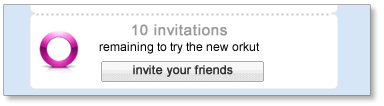
 on their profile next to their name, they probably have an invitation they can share with others - so be bold, and ask them for one!
Friday, November 20, 2009
SPDY Protocol | From dev.chromium.org
Overview
One of the bottlenecks of current HTTP is that it relies solely on multiple connections for concurrency. This causes several problems, including additional round trips for connection setup, slow-start delays, and a constant rationing by the client where it tries to avoid opening too many connections to a single server. HTTP "pipelining" doesn't help, as each connection may be blocked on the request at the head of the line; in addition, many proxies apparently have poor support for pipelining. Applications, in their desire to create many connections, create many sub-domains to work around browser per-domain connection throttling.
SPDY aims to address this and other application-layer problems associated with modern web applications, while requiring little or no change from the perspective of web application writers.
In a nutshell, SPDY adds a framing layer for multiplexing multiple, concurrent streams across a single TCP connection. The framing layer is optimized for HTTP-like request-response streams.
The SPDY session offers three basic improvements over HTTP:
- Multiplexed requests. There is no limit to the number of requests that can be issued concurrently over a single SPDY connection. Because requests are interleaved on a single channel, the efficiency of TCP is much higher.
- Prioritized requests. Clients can request certain resources to be delivered first. This avoids the problem of congesting the network channel with non-critical resources when a high-priority request is pending.
- Compressed headers. Clients today send a significant amount of redundant data in the form of HTTP headers. Because a single web page may require 50 or 100 subrequests, this data is significant. Compressing the headers saves a significant amount of latency and bandwidth compared to HTTP.
Note that for the most part, SPDY attempts to preserve the existing semantics of HTTP features. All features such as cookies, etags, vary headers, content-encoding negotiations, etc work exactly as they do with HTTP; SPDY only replaces the way the data is written to the network.
Definitions
- connection: A TCP-level connection between two endpoints.
- endpoint: Either the client or server of a connection.
- session: A framed sequence of data chunks. Frames are defined as SPDY frames; see Framing below.
- stream: A bi-directional flow of bytes across a virtual channel within a SPDY session.
Main differences from HTTP
SPDY is intended to be as compatible as possible with current web-based applications. This means that, from the perspective of the server business logic or application API, nothing has changed. To achieve this, all of the application request and response header semantics are preserved. SPDY introduces a "session" which resides between the HTTP application layer and the TCP transport to regulate the flow of data. This "session" is akin to an HTTP request-response pair. The following changes represent the differences between SPDY and HTTP:
The request
To initiate a new request, clients first create a new SPDY session. Once the session is created, the client can create a new SPDY stream to carry the request. Part of creating the stream is sending the HTTP header block. The HTTP header block in SPDY is almost unchanged from today's HTTP header block, with the following differences:
- The first line of the request is unfolded into name/value pairs like other HTTP headers. The names of the first line fields are
method,url, andversion. These keys are required to be present. The 'url' is the fully-qualified URL, containing protocol, host, port, and path. - Duplicate header names are not allowed.
- Header names are all lowercase.
- The
ConnectionandKeep-Aliveheaders are no longer valid and are ignored if present. - Clients are assumed to support
Accept-Encoding: gzip. Clients that do not specify any body encodings receive gzip-encoded data from the server. - HTTP request headers are compressed. This is accomplished by compressing all data sent by the client with gzip encoding.
- The "host" header is ignored. The host:port portion of the HTTP URL is the definitive host.
- POST-specific changes:
- POST requests are expected to contain a data stream as part of the post; see Data flow below.
Content-lengthis only advisory for length (so that progress meters can work).- Chunked encoding is no longer valid.
- The POST data stream is terminated by a zero-length data frame.
The response
When responding to a HTTP request, servers will send data frames using the SPDY stream created by the client. The response is similar to HTTP/1.1 in that it consists of a header block followed by a body. However, there are a few notable changes:
- The response status line is unfolded into name/value pairs like other HTTP headers. The names of the status line are
statusandversion. These keys are required to be present - If the SPDY reply happens before a SYN_STREAM, then it includes parameters that inform the client regarding the request that would have been made to receive this response, by including
urlandmethodkeys.
- All header names must be lowercase.
- The
ConnectionandKeep-aliveresponse headers are no longer valid. Content-lengthis only advisory for length.- Chunked encoding is no longer valid.
- Duplicate header names are not allowed.
Connections
The first implementation of the SPDY session runs atop TCP, similarly to how HTTP works today. The client is expected to be the TCP connection initiator. Because it runs on TCP, we have a reliable transport. Unlike HTTP, all connections with SPDY are persistent connections. The HTTP connection header does not apply.
For best performance, it is expected that clients will not close open connections until the user navigates away from all web pages referencing a connection, or until the server closes the connection. Servers are encouraged to leave connections open for as long as possible, but can terminate idle connections after some amount of inactivity if necessary.
Framing
Once the TCP connection is established, clients and servers exchange framed messages. There are two types of frames: control frames and data frames. Frames always have a common header which is 8 bytes.
The first bit is a control bit indicating whether a frame is a control frame or data frame. Control frames carry a version number, a frame type, flags, and a length. Data frames contain the stream ID, flags, and the length for the payload carried after the common header. The simple header is designed to make reading and writing of frames easy.
All integer values, included length, version, and type, are in network byte order. SPDY does not enforce alignment of types in dynamically sized frames.
And More about SPDY : http://dev.chromium.org/spdy/spdy-protocol