Thursday, January 28, 2010


Chrome Tip: Managing tabs on Google Chrome

When you're using the same browser window to check your email and calendar, write a report, do some research, and watch a few YouTube videos, the tabstrip can become pretty crowded. With Google Chrome, we tried to make it easy to keep your tabs organized.

You can use the mouse to grab a tab and drag it around in the tabstrip, to keep related tabs close to each other.
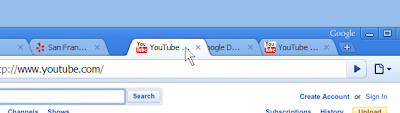

If you need even better delineation between tasks, just drag a tab out of the strip entirely and drop it somewhere on your desktop. You'll get a whole new window to keep stuff in, and you can then drag more tabs from your old window to your new one.
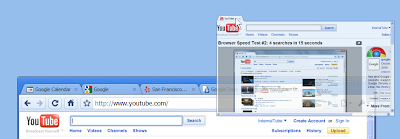

Didn't mean to create that window? Just drag the tab you dropped back up to the original tabstrip to put it back.

Of course, sometimes you don't want to move tabs, you just want to get rid of them. If you find that highlighting the little "x" that closes a tab is too tricky, you can just point at any part of the tab in the tabstrip and press your mouse's middle button. This makes it just a little easier to go close a tab.


And after you close one tab, the next tab will slide right under your mouse, so if you want to close a bunch, you can just keep clicking.

Source & Recent Posts from Google Blogs :
http://chrome.blogspot.com/2010/01/tip-managing-tabs.html
http://gmailblog.blogspot.com/2010/01/serving-better-ads-in-gmail.html
http://youtube-global.blogspot.com/2010/01/new-thumbnail-flipbook-in-upload-shows.html
http://google-au.blogspot.com/2010/01/googles-privacy-principles.html
http://booksearch.blogspot.com/2010/01/updated-books-home-page-and-my-library.html
http://googleblog.blogspot.com/2010/01/googles-privacy-principles.html

Sunday, January 24, 2010


Wish you happy birthday Orkut :-)


Ariel, on behalf of the orkut team Say's

It may not have popped up in your birthdays list, but today is orkut's big day: the site is now 6 years old! In the past 6 years we've learned to walk, talk, and color inside the lines, among many other achievements. We've even shaken things up and reinvented ourselves not once but twice!

More importantly, we've made a ton of great friends along the way (over 80 million worldwide), and are happy to include you among them.

Thanks for sticking with us for all of these years. There's plenty more to come from the orkut team, so we look forward to many more birthdays together!

Recent posts from Google Blogs:
http://en.blog.orkut.com/2010/01/orkuts-6th-birthday.html
http://blog.orkut.com/2010/01/6-anos-de-orkut.html
http://youtube-global.blogspot.com/2010/01/sundance-film-festival-rentals-now.html
http://googlejapan.blogspot.com/2010/01/tech-talk-in-google-1-30.html
http://buzz.blogger.com/2010/01/important-note-to-ftp-users.html
http://gmailblog.blogspot.com/2010/01/serving-better-ads-in-gmail.html
http://googlephotos.blogspot.com/2010/01/use-your-extra-storage-to-store-any.html
http://googleblog.blogspot.com/2010/01/this-week-in-search-12210.html
http://youtube-global.blogspot.com/2010/01/youtubes-all-access-pass-to-davos.html

Thursday, January 21, 2010


Google Blogs Update [Google Wave / GMail]

New features: Read-only and Restore

Read-Only Participants
The creator of a wave can now change other participants on the wave between full access and read-only by clicking on their picture at the top of the wave panel, and selecting the access level in the drop-down:


As the name implies, read-only participants are prevented from making any changes to the wave, including adding new participants. They can, however, view live changes to the wave, and look at the history in playback.

You can make entire groups read-only as well, including the "public" group, which includes all Google Wave users. Note that individual permissions take precedence over group permissions, so even if a group has full access, an individual can be given read-only access, and vice versa.

Restore from Playback
Anyone with full access to a wave can now restore that wave to any previous state visible in playback:


[+] Read More

Serving better ads in Gmail

Ever since we launched Gmail, we've tried to show relevant and unobtrusive ads. We're always trying to improve our algorithms to show better, more useful ads.

When you open a message in Gmail, you often see ads related to that email. Let's say you're looking at a confirmation email from a hotel in Chicago. Next to your email, you might see ads about flights to Chicago.

But sometimes, there aren't any good ads to match to a particular message. From now on, you'll sometimes see ads matched to another recent email instead. For example, let's say you're looking at a message from a friend wishing you a happy birthday. If there aren't any good ads for birthdays, you might see the Chicago flight ads related to your last email instead.

[+] Read More

More recent posts from Google Blogs
http://googlepolska.blogspot.com/2010/01/lepiej-dopasowane-reklamy-w-gmailu.html
http://analytics.blogspot.com/2010/01/clicks-vs-visits-revisited.html
http://google-produkt-kompass.blogspot.com/2010/01/gezieltere-werbung-in-google-mail.html
http://googlewave.blogspot.com/2010/01/new-features-read-only-and-restore.html
http://youtube-global.blogspot.com/2010/01/introducing-youtube-html5-supported.html
http://gmailblog.blogspot.com/2010/01/serving-better-ads-in-gmail.html

Wednesday, January 20, 2010


Google Blogs Update [Orkut / Google Search]

Auto-Magic Groups

Have you ever wanted to see updates only from your family members or colleagues? Or have you ever tried to share a photo with college friends and had to select each recipient manually? If you have a lot of friends it could mean selecting dozens of people, one at a time. What if you could easily group them and interact with all of them at once?

As managing a large list of friends and keeping it up-to-date can be very time-consuming and not much fun, we came up with a solution: Auto-Magic Groups, a new feature that, as the name suggests, "automagically" figures out any friend groups you may have and also suggests labels for those groups.


Clicking the "edit groups" link will pull up groups you previously created, as well new groups suggested by orkut. You can reject orkut-suggested groups, or further customize them (the way you do with groups you've created yourself) by naming them and deleting or adding people to existing groups. Also, orkut tries to identify communities most closely related to each group.


Helping computers understand language

An irony of computer science is that tasks humans struggle with can be performed easily by computer programs, but tasks humans can perform effortlessly remain difficult for computers. We can write a computer program to beat the very best human chess players, but we can't write a program to identify objects in a photo or understand a sentence with anywhere near the precision of even a child.


Enabling computers to understand language remains one of the hardest problems in artificial intelligence. The goal of a search engine is to return the best results for your search, and understanding language is crucial to returning the best results. A key part of this is our system for understanding synonyms.

What is a synonym? An obvious example is that "pictures" and "photos" mean the same thing in most circumstances. If you search for [pictures developed with coffee] to see how to develop photographs using coffee grinds as a developing agent, Google must understand that even if a page says "photos" and not "pictures," it's still relevant to the search. While even a small child can identify synonyms like pictures/photos, getting a computer program to understand synonyms is enormously difficult, and we're very proud of the system we've developed at Google.

Here are screenshots of those disambiguations of GM in action:


Recent Posts from other google blog's:
http://googlewebmastercentral-ja.blogspot.com/2010/01/blog-post_20.html
http://googlethailand.blogspot.com/2010/01/blog-post.html
http://googlejapan.blogspot.com/2010/01/blog-post_20.html
http://www.googlechinawebmaster.com/2010/01/blog-post_20.html
http://google-latlong.blogspot.com/2010/01/making-grade-by-mapping-candides.html
http://googleblog.blogspot.com/2010/01/helping-computers-understand-language.html
http://en.blog.orkut.com/2010/01/auto-magic-groups.html