Saturday, January 29, 2011


Orkut is still going strong after 7 years

original post by Eduardo Thuler, product manager

On Monday, we celebrated Orkut's 7th birthday with a doodle. Thanks to you, our users, Orkut is still going strong, and we continue to work hard at improving it for you all.


Since 2005 we've launched more than 30,000 visible and invisible improvements to keep Orkut fresh and useful for you. Some of the more visible of the changes that you may have seen in the last year include photo editing right inside Orkut via Picnik, badges, themes, branded communities and many more. Innovating on features that users would love is important to us, so we were happy to be the first to offer Groups, an easy-to-use privacy dashboard and high-resolution video chat inside Orkut.

Photos and scraps continue to be strong features, and over the last month, we've hit a few records. On Christmas Eve, users shared 93 milion scraps, an all-time high, and on January 3rd after New Years, users viewed 1.6 billion photos, which is almost 19,000 photo views a second. For context, YouTube crossed the 1 billion video view mark in October 2009, and crossed the 2 billion mark in May of last year.

To help us innovate on features and obtain good feedback on possible product improvements we run experiments, much like the Google homepage does. For example, we know that users like to see updates from their friends on orkut. While we usually show about 20 friend updates at most, could it be that more updates are better? To answer the question, we ran an experiment to show 40 friend updates to 1% of our users. While some users clicked on, commented and replied to these updates, we learned that others interacted less due to the increased time it took us to show them the extra updates. In this experiment, we received enough information to realize that more updates were probably not better for our users -- so of course, we decided not to move forward with that idea. On the other hand, most of our recent launches came from successful experiments.

Users also love apps inside Orkut, and spend much of their time playing social games by top app developers such as Vostu (developer of Mini Fazenda, Café Mania), Mentez (Colheita Feliz, Vida nas Passarelas), Studio Sol (Eu Sou, Minha Música) and others. For many of our top developers, Orkut represents the majority of their business, which means, more great games for all of you. A few fun stats to share: Mini Fazenda has 17 million users (and 2.5 billion seeds planted every month!), Café Mania with 13 million users (1.25 billion dishes created every month) and Eu Sou with more than 28 million football-related application installs!

As part of our birthday celebration, we launched an official branded community for Orkut users at www.orkut.com/orkut and we are releasing a special anniversary theme. Join the community and share your favorite moment on Orkut with us. And if you have a lot of ideas about our products, we're hiring! Check out google.com/jobs to find out more. Thanks again to you, our users. [tags:#orkut, #orkut7]

see also
http://en.blog.orkut.com/2011/01/orkut-is-still-going-strong-after-7.html
http://gmailblog.blogspot.com/2011/01/desktop-notifications-for-emails-and.html
http://googleblog.blogspot.com/2011/01/tech-for-good-catching-up-on-googleorg.html

Friday, January 28, 2011


Crazzy about World Cup? check this!


https://blogger.googleusercontent.com/img/b/R29vZ2xl/AVvXsEhIejGcli4dKeev_nsSpV9lLoDcKkLsdYRYeO3-GJj-4eKQh3bkffwOPC3kGlBlBQ03k_hhDdZTpm2s-b8As_hNL668STGzuFGQxEavFuM04V9rGCONmZIAV6BjSoZFkFYnIhkvlPlfKiGn/s400/stadium.jpeg
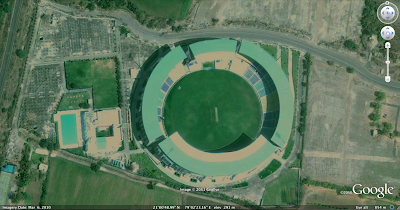
Can you identify this stadium? Are you crazy enough about cricket to stay up late watching the last ball of any match? Do you drive/cycle/walk around a lot and love using maps to plan your moves? If you answered yes to either or both, then come help us map all 13 venues where the cricket world cup matches will be played; on Google Map Maker. Look at this example for inspiration!

Many cricket fans will be visiting these stadiums for the first time, most of them would not have visited your city prior to this. As a true-blue cricket fan and as a connoisseur of your city, it would be great if you could map out the layout of the stadium including
  • Each stand in the stadium,
  • Parking lots in and around the stadium,
  • Nearby areas of interest, etc.
You could add a feather in the cap of your city by also mapping out all important roads leading in to and out of the stadium from all major locations in the city (for example, the road from the airport to the stadium). You can also collaborate with other users mapping in your countries.

Considering the nature of the crowd that will be coming in to the stadiums you might also consider mapping all the waterholes around the stadium along with the best restaurants and hotels (who knows, one of these might even be hosting the teams playing!)

If you need pointers, see how other mappers are going about mapping out their favorite stadiums. And if you are too late to map one of the 13 venues, remember there are other great stadiums you can help with.

see also:
http://googleindia.blogspot.com/2011/01/google-map-maker-catches-world-cup.html
http://gmailblog.blogspot.com/2011/01/desktop-notifications-for-emails-and.html

Thursday, January 27, 2011


You will not miss any Mails/Chats

Many of us are guilty of constantly switching back to Gmail to check for new messages. And if you're like me, you've probably missed an important chat message because you weren't looking at your Gmail window when it came in. If you use Google Chrome, these days can be over since we just launched HTML5 desktop notifications which display pop-ups whenever a chat message or new email arrives.


To turn them on, click on the Settings link in the top right corner of Gmail and scroll down to the "Desktop Notifications" section. If you just want to get notified about chat messages, or if you use Priority Inbox and only want to get notifications for important messages, you can customize your settings from there too.


This functionality is currently only available for people using Google Chrome, but we're working to make notifications part of the standard Web platform.

source: http://gmailblog.blogspot.com/2011/01/desktop-notifications-for-emails-and.html

Wednesday, January 26, 2011


You will not miss any mails - New in Labs [Unread message icon ]

original post from Manu Cornet, Software Engineer,

When you're visiting sites other than Gmail, it's easy to find out how many unread messages are in your inbox by glancing at the title of your Gmail tab or window. However, if you have a ton of tabs open, or if you use Chrome's "Pin Tab" feature that hides everything except the tab's icon, it can be tricky to figure out without switching tabs.

If you've ever found yourself in this situation, you may like the new Unread message icon we just added to Gmail Labs. It embeds the number of unread messages you have right into the Gmail icon itself, like this:


To turn it on, go to the Labs tab in Settings, enable this lab, and click the "Save Changes" button at the very bottom of the page. Note that it'll only works in Chrome (version 6 and above) and Firefox (version 2 and above).