Thursday, August 5, 2010


Google Drops Google Wave!!!

Original post by Joab Jackson, (computerworld.com)

https://blogger.googleusercontent.com/img/b/R29vZ2xl/AVvXsEi0PxhMHizkHxMXHRkQpSRdn2f4PjNOLx1N2WcOvxhzxPkv98HmmyQYTQC-dcCH24rc5yvDyMJnatwC3I1DZQJni3BvdR16FLDSNd2erfiT4oJ7qRGs44Vdd9vTmfsAh9TCMvYjaF7W3jE/s320/Google_Wave_logo_thumb.png

A little more than a year after the service was launched, Google is pulling the plug on its Google Wave social-networking service, the company said Wednesday.

"Wave has not seen the user adoption we would have liked," wrote Urs Hölzle, Google senior vice president for operations, in a blog post. As a result of the public indifference, "We don't plan to continue developing Wave as a stand-alone product," he said.

The company will maintain the service through the end of the year, and the technology will be rolled into other Google projects, Hölzle said. Some features are already available as open-source components, and Google will offer tools to let users "easily 'liberate' their content from Wave," he said.

Hölzle implied that Wave might have been too radical of a concept for mass adoption, despite the company's many attempts to explain it to the public.[...]

Read More at http://www.computerworld.com/s/article/9180161/Google_drops_Google_Wave

Recent Posts:
Google  |  Blogger  |  Gmail  |  GMobile  |  Chrome  |  GEarth  |  Orkut  |  Wave  |  Youtube  |  G Korea  |  G Aus  |  G NZ  |  Adwords  |  Analytics  |  Picasa


Ultimate sports in Chrome Extensions

Football season is coming soon. There are also many other sports events like baseball, tennis, golf and soccer that are in full swing. For die-hard sports fans out there, I found some handy Chrome extensions to help you track all the games, matches and player stats.


The Are You Watching This?! Sports extension alerts you when games get interesting via colored icons, so you know when to turn in. It lists the scores, news and TV listings for many professional and college sports in the US.
For those who need an edge in your fantasy sports leagues, there are a few Chrome extensions that can help you improve your fantasy team fast. Pickemfirst Fantasy Sports works with Yahoo!, ESPN, CBS and many other fantasy sports websites. This extension brings you news, stats and blogger opinions about all the players mentioned on the web page currently displayed in your browser.

Tweetbeat Firsthand brings in recent tweets from people and organizations mentioned in the page you're looking at. With this extension, you can see what players, coaches, sports bloggers and commentators think about upcoming matchups.
If following sports online is not enough for you. StubHub's Event Ticket Finder helps you find last-minute tickets to your favorite sports events right in your browser.

These are just a few extensions to help you stay on top of your game, and you can find many more in the Chrome extensions gallery.

Recent Posts:
Google  |  Blogger  |  Gmail  |  GMobile  |  Chrome  |  GEarth  |  Orkut  |  Wave  |  Youtube  |  G Korea  |  G Aus  |  G NZ  |  Adwords  |  Analytics  |  Picasa

Wednesday, August 4, 2010


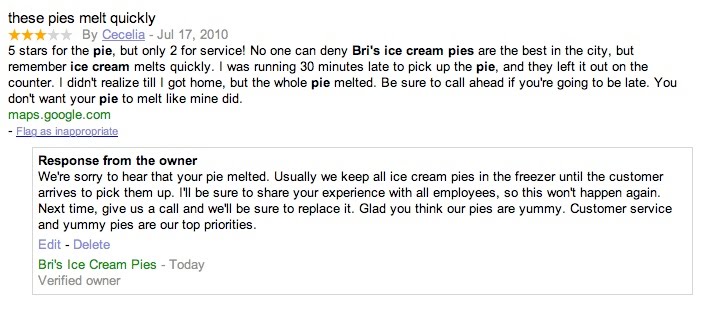
So you can respond to reviews for your business on Google Place Page

Whether you're looking for a great lounge to hang out with your friends or a trusty shop to repair your bicycle, the web is a great place to discover and learn about local businesses and services. Some of the listings on Google Maps showcase reviews to help prospective customers make informed decisions and find the places that are just right for them. Reviews on Google Maps are assembled from a variety of sources on the web to give you the best possible overview of what people are saying about a specific place. We also encourage users to share their opinions by writing reviews directly on the Place Page of any place they've visited, be it a local business, tourist attraction or the like.

Starting today, if you're a verified Google Places business owner, you can publicly respond to reviews written by Google Maps users on the Place Page for your business. Engaging with the people who have shared their thoughts about your business is a great way to get to know your customers and find out more. Both positive and negative feedback can be good for your business and help it grow (even though it's sometimes hard to hear). By responding, you can build stronger relationships with existing and prospective customers. For example, a thoughtful response acknowledging a problem and offering a solution can often turn a customer who had an initially negative experience into a raving supporter. A simple thank you or a personal message can further reinforce a positive experience. Ultimately, business owner responses give you the opportunity to learn what you do well, what you can do better, and show your customers that you're listening.

Before writing your first response, we recommend reading our handy tips on how to respond to reviewers. Then take a stab at responding by following these instructions. If you have not yet verified ownership for your business on Google, please visit Google Places to claim your listing.

Recent Posts:
Google  |  Blogger  |  Gmail  |  GMobile  |  Chrome  |  GEarth  |  Orkut  |  Wave  |  Youtube  |  G Korea  |  G Aus  |  G NZ  |  Adwords  |  Analytics  |  Picasa


Introducing the new Search History link on Google

From Ran Liu, Software Engineer and Nick Fey, User Experience Designer, Google Mobile Team

Have you ever tried to remember how to get back to a website that you found from a recent search? Today in the US, we're launching a new search history feature which helps you quickly get back to sites you've been to and see items you have starred from your Android, iPhone, or desktop searches. Just sign in and then tap the history link at the bottom of the Google homepage.
If you've enabled search history in your account (tap "Settings" and select "Save Searches" under "Search History", then tap "Save"), the history that you see is a combination of all your searches done while you are signed-in, whether you are searching from a laptop at home, your desktop computer at work, or your phone while on-the-go. Your mobile searches are marked with a little phone icon so you can tell them apart. For websites you've visited while searching on a desktop or laptop, you'll see screenshot thumbnails that can help you recognize and return to the right sites quickly.
If you want to remove any history items, you can tap the "Edit" button at the top of the page and delete individual search queries. If you prefer to stop recording search history all together, choose the "Do not save searches" option under "Settings" on the home screen and tap "Save."

At the top of the History page, you can also select your "Starred items," which shows a list of search results you've starred on your computer or phone. Let's say after researching places to snorkel in Hawaii, you found a website full of photos about Kealakekua Bay that you want to return to later. To star the Kealakekua Bay website, simply click on the star next to the Kealakekua Bay website on Google search results. Thereafter, whenever you want to return to the site, simply click on the "Starred items" option in history. This way, while you're out with friends, you can easily get back to the website and show pictures of this magical cove right from your phone.
We hope you find the new History link useful!

Recent Posts:
Google  |  Blogger  |  Gmail  |  GMobile  |  Chrome  |  GEarth  |  Orkut  |  Wave  |  Youtube  |  G Korea  |  G Aus  |  G NZ  |  Adwords  |  Analytics  |  Picasa