Saturday, November 5, 2011


The New Chrome Beta

Chrome's Beta release fixes all that. Signing in to Chrome enables sync and brings your Chrome bookmarks and other personalized settings to all of your computers. Anything you update on one device instantly updates everywhere else, and your stuff is safe in case a truck runs over your laptop. Just go to the Wrench menu and select "Sign in to Chrome."

But what if you share a computer with family or friends? You may not want your bookmarks and settings mixing with your brother's or your roommate's bookmarks and settings, and you wouldn't want their Chrome stuff syncing to your other devices.

In today's Beta release, we've added a new feature that lets people who use a shared computer each have their own personalized Chrome, and lets them each sign in to Chrome to sync their stuff.
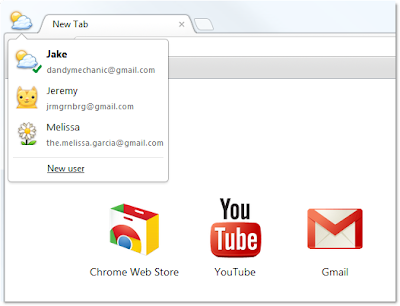

To try it out, go to Options (Preferences on Mac), click Personal Stuff, and click "Add new user." A fresh instance of Chrome will open, ready to be customized with its own set of apps, bookmarks, extensions, and other settings. A badge in the upper corner lets you know at a glance that this new Chrome browser belongs to you, and you can customize the name and badge as you like. Clicking this badge drops down a menu of all the users on that computer, so you can easily switch between them. In addition, each user can sign in to Chrome to access their own personalized Chrome across all their computers.

One thing to keep in mind is that this feature isn't intended to secure your data against other people using your computer, since all it takes is a couple of clicks to switch between users. We want to provide this functionality as a quick and simple user interface convenience for people who are already sharing Chrome on the same computer today. To truly protect your data from being seen by others, please use the built-in user accounts in your operating system of choice.


Recent Posts: Chrome / Google Blog

Wednesday, November 2, 2011


Wow Its Gmail. Have you tried this?

Streamlined conversations
Conversation view has been completely redesigned to help you read through your email threads. You'll now see profiles pictures for your contacts, so it's easier to keep track of who said what. We also stripped out as much as possible so you can focus on communicating with your friends and colleagues.


Elastic density
We know that you use Gmail from a variety of screen sizes and devices, so now the spacing between elements on the screen will automatically change based on the kind of display you're using. If you prefer a denser view all the time, you can change your density manually in the Settings menu.


New HD themes
Themes have been completely rebuilt to enable us to bring you a new set of beautiful high resolution themes with imagery provided by iStockphoto. We've updated most of the old favorites as well and your theme will be automatically carried over to the new look. Go to the Settings menu to take another look at themes and choose the one that fits you best. 


Smarter navigation
The navigation panel on the left keeps your labels and chat contacts in view at all times. It's also more customizable: you can resize the labels and chat areas if you want to see more, or hide the chat area entirely via the chat icon in the lower left. You can also use the arrow keys to navigate around the interface.


Better search
Click the dropdown in the search box to see a new advanced search panel, which makes it easier and faster to find exactly what you're looking for. You can use the same panel to create a filter from any search in just a few clicks.


We're excited to finally share Gmail's new look with you. We'll be bringing these changes to everyone soon, but if you'd like to make the switch right away, we're rolling out a Switch to the new look link in the bottom-right of Gmail over the next few days.

Note: The new look is now available to everyone. Refresh Gmail if you don't see the link to switch.

Wednesday, October 19, 2011


Introducing Galaxy Nexus. Simple, beautiful, beyond smart


Description: Galaxy Nexus is the next generation of Nexus devices co-developed by Samsung and Google. Nexus combines innovative hardware with the newest version of Android, 4.0, Ice Cream Sandwich, and the latest Google mobile services.

Video Link: http://www.youtube.com/watch?feature=player_profilepage&v=-F_ke3rxopc

Friday, October 14, 2011


Taste of Ice Cream Sandwich [Video]