Wednesday, November 30, 2011


Introducing the New Google Bar

Original post by Eddie Kessler from Official Google Blog

Six months ago we started rolling out a new look and feel for Search, News, Maps, Translate, Gmail and a bunch of other products. Our goal was to create a beautifully simple and intuitive user experience across Google. 

We’re now ready for the next stage of our redesign—a new Google bar that will enable you to navigate quickly between our services, as well as share the right stuff with the right people easily on Google+. 


Instead of the horizontal black bar at the top of the page, you’ll now find links to your services in a new drop-down Google menu nested under the Google logo. We’ll show you a list of links and you can access additional services by hovering over the “More” link at the bottom of the list. Click on what you want, and you’re off.


Link to video: http://www.youtube.com/watch?feature=player_embedded&v=vSIMpFfNLEA


Making navigation and sharing super simple for people is a key part of our efforts to transform the overall Google experience, which is why we’re very excited about this redesign. Enjoy!

Wednesday, November 23, 2011


Google Wave's Last Step

Original post by Google Wave Team from Google Wave Blog

More than a year ago we announced that Google Wave would no longer be developed as a separate product. At the time we committed to maintaining the site at least through the end of 2010. Today we're sharing the specific dates for ending this maintenance period and shutting down Wave. As of January 31, 2012, all waves will be read-only, and the Wave service will be turned off on April 30, 2012. You will be able to continue exporting individual waves using the existing PDF export feature until the Google Wave service is turned off. So we'd encourage you to export any important data before April 30, 2012.

If you would like to continue using Wave, there are a number of open source projects, including Apache Wave. There is also an open source project called Walkaround that includes anexperimental feature to import all your Waves from Google. This feature will work until the Wave service is turned off on April 30, 2012.

For more details, please see help center.

Thursday, November 17, 2011


Google Music Officially Released [Download APK]


Google announced today that their music streaming service is now out of beta and available to all US users, no invite required. It's also staying free, letting you stream up to 20,000 songs to all your devices, as well as adding a music store that integrates with the streaming service.


Features
* All your your music purchases from Android Market automatically appear on Google Music.
* Add up to 20,000 more songs from your personal music collection on your computer for free.
* Access to your entire music library instantly with the Google Music app, and save your favorites for offline playback.
* Share a free full play of the songs you purchased from Android Market with your friends on Google+. 
* Learn more about Google Music at http://music.google.com/about
* Available in the U.S. only.


Android Market  /  Download APK (will works for all)

Google Blog Link

Saturday, November 5, 2011


The New Chrome Beta

Chrome's Beta release fixes all that. Signing in to Chrome enables sync and brings your Chrome bookmarks and other personalized settings to all of your computers. Anything you update on one device instantly updates everywhere else, and your stuff is safe in case a truck runs over your laptop. Just go to the Wrench menu and select "Sign in to Chrome."

But what if you share a computer with family or friends? You may not want your bookmarks and settings mixing with your brother's or your roommate's bookmarks and settings, and you wouldn't want their Chrome stuff syncing to your other devices.

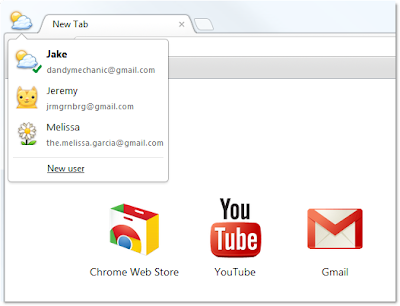
In today's Beta release, we've added a new feature that lets people who use a shared computer each have their own personalized Chrome, and lets them each sign in to Chrome to sync their stuff.


To try it out, go to Options (Preferences on Mac), click Personal Stuff, and click "Add new user." A fresh instance of Chrome will open, ready to be customized with its own set of apps, bookmarks, extensions, and other settings. A badge in the upper corner lets you know at a glance that this new Chrome browser belongs to you, and you can customize the name and badge as you like. Clicking this badge drops down a menu of all the users on that computer, so you can easily switch between them. In addition, each user can sign in to Chrome to access their own personalized Chrome across all their computers.

One thing to keep in mind is that this feature isn't intended to secure your data against other people using your computer, since all it takes is a couple of clicks to switch between users. We want to provide this functionality as a quick and simple user interface convenience for people who are already sharing Chrome on the same computer today. To truly protect your data from being seen by others, please use the built-in user accounts in your operating system of choice.


Recent Posts: Chrome / Google Blog