Friday, January 28, 2011


Crazzy about World Cup? check this!


https://blogger.googleusercontent.com/img/b/R29vZ2xl/AVvXsEhIejGcli4dKeev_nsSpV9lLoDcKkLsdYRYeO3-GJj-4eKQh3bkffwOPC3kGlBlBQ03k_hhDdZTpm2s-b8As_hNL668STGzuFGQxEavFuM04V9rGCONmZIAV6BjSoZFkFYnIhkvlPlfKiGn/s400/stadium.jpeg
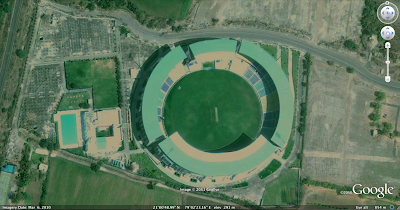
Can you identify this stadium? Are you crazy enough about cricket to stay up late watching the last ball of any match? Do you drive/cycle/walk around a lot and love using maps to plan your moves? If you answered yes to either or both, then come help us map all 13 venues where the cricket world cup matches will be played; on Google Map Maker. Look at this example for inspiration!

Many cricket fans will be visiting these stadiums for the first time, most of them would not have visited your city prior to this. As a true-blue cricket fan and as a connoisseur of your city, it would be great if you could map out the layout of the stadium including
  • Each stand in the stadium,
  • Parking lots in and around the stadium,
  • Nearby areas of interest, etc.
You could add a feather in the cap of your city by also mapping out all important roads leading in to and out of the stadium from all major locations in the city (for example, the road from the airport to the stadium). You can also collaborate with other users mapping in your countries.

Considering the nature of the crowd that will be coming in to the stadiums you might also consider mapping all the waterholes around the stadium along with the best restaurants and hotels (who knows, one of these might even be hosting the teams playing!)

If you need pointers, see how other mappers are going about mapping out their favorite stadiums. And if you are too late to map one of the 13 venues, remember there are other great stadiums you can help with.

see also:
http://googleindia.blogspot.com/2011/01/google-map-maker-catches-world-cup.html
http://gmailblog.blogspot.com/2011/01/desktop-notifications-for-emails-and.html

Thursday, January 27, 2011


You will not miss any Mails/Chats

Many of us are guilty of constantly switching back to Gmail to check for new messages. And if you're like me, you've probably missed an important chat message because you weren't looking at your Gmail window when it came in. If you use Google Chrome, these days can be over since we just launched HTML5 desktop notifications which display pop-ups whenever a chat message or new email arrives.


To turn them on, click on the Settings link in the top right corner of Gmail and scroll down to the "Desktop Notifications" section. If you just want to get notified about chat messages, or if you use Priority Inbox and only want to get notifications for important messages, you can customize your settings from there too.


This functionality is currently only available for people using Google Chrome, but we're working to make notifications part of the standard Web platform.

source: http://gmailblog.blogspot.com/2011/01/desktop-notifications-for-emails-and.html

Wednesday, January 26, 2011


You will not miss any mails - New in Labs [Unread message icon ]

original post from Manu Cornet, Software Engineer,

When you're visiting sites other than Gmail, it's easy to find out how many unread messages are in your inbox by glancing at the title of your Gmail tab or window. However, if you have a ton of tabs open, or if you use Chrome's "Pin Tab" feature that hides everything except the tab's icon, it can be tricky to figure out without switching tabs.

If you've ever found yourself in this situation, you may like the new Unread message icon we just added to Gmail Labs. It embeds the number of unread messages you have right into the Gmail icon itself, like this:


To turn it on, go to the Labs tab in Settings, enable this lab, and click the "Save Changes" button at the very bottom of the page. Note that it'll only works in Chrome (version 6 and above) and Firefox (version 2 and above).


Weather on your mobile phone!

original post from Robert Dong, Software Engineer

We'd been wanting to build a fun, useful, app-like way to display weather information on our search results pages in the mobile browser. So we pulled together a user experience designer and team of engineers and built a new weather search results snippet that lets you actually play with the results. To try it out, just go to google.com on your iPhone or Android-powered device and search for 'weather'.


At first glance, you'll see content that we'd previously shown you before: current conditions and a forecast for the next few days. But by moving the slider over the next 12 hours, you can now see a detailed hour-by-hour breakdown of the changing weather conditions. As you do this, keep an eye on the temperature, wind speed and humidity and see how all these conditions are expected to trend across the day. You may also notice that the background color changes throughout the day. Of course, as you scroll further down you'll see our regular web search results for your query.

This new weather search experience is available only in English, but we have more updates on the way. We hope you'll enjoy using it!

see also: