Saturday, March 27, 2010


Another feature in Orkut! add images easily in scraps.

Arco Domingues, (orkut operations team) Say's

We're always listening to what users have to say about orkut, and we're constantly working to improve your orkut experience. One of the suggestions we've received many times is to bring back to the ability to add photos to your scraps to the new orkut. We're happy to announce that this feature is now available!

To add images to your scraps, first click the text box to write and edit a message. You'll then see customization options, such as font color and emoticons. Click the image icon to add an image to your your scrap:


You can upload images from your computer, add from your Picasa Web Albums, or search for them in Google Images.

As we like to say, a picture is worth a thousand words. So, hopefully this feature will improve the way you share things with your friends on orkut!


Source / Related / Recent :
http://en.blog.orkut.com/2010/03/now-you-can-easily-add-images-to-your.html
http://googleblog.blogspot.com/2010/03/this-week-in-search-32610.html
http://googleblog.blogspot.com/2010/03/tomorrow-night-turn-off-your-lights.html
http://blog.chromium.org/2010/03/google-chrome-developer-update.html
http://gmailblog.blogspot.com/2010/03/detecting-suspicious-account-activity.html

Friday, March 26, 2010


Direct import from Picasa for Orkut!

Megha Gupta, (software engineer) Say's

For many of us, the best part about taking photos is sharing them with friends and family online.

That's why we've integrated Picasa Web Albums (Google's free photo hosting and sharing service) with orkut, so that you can directly copy your favorite Picasa photos onto orkut with just a few clicks and easily share them with your orkut friends.

Look for the "import from Picasa" link when you create an orkut album from the orkut photos page or when adding photos within an existing album.


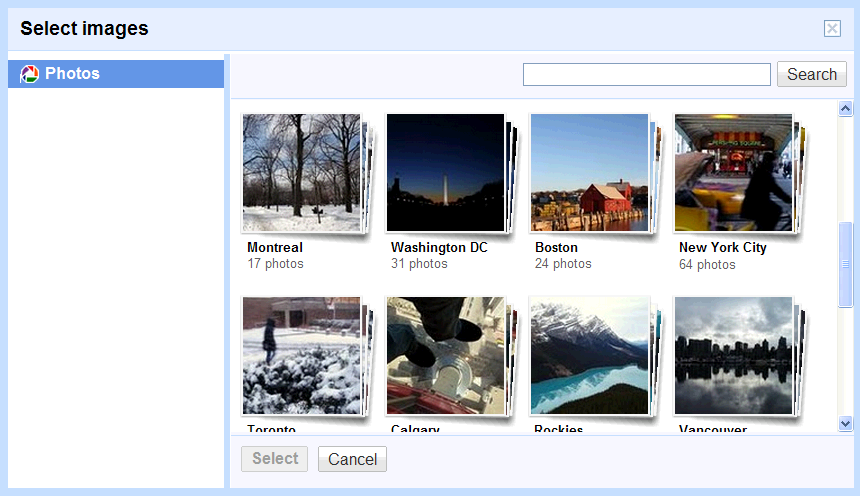
When you click on it, a photo picker will show up where you can access all of your Picasa Web Albums. Choose an album to see all the photos in it:


Next, just select the photos you want to upload to orkut. Be assured, the photos will not be erased from your Picasa account. A copy of the photos will become available on orkut once you complete the upload.

The cool convenience with this feature is that you don't have to download the photos to your computer and then re-upload them to orkut again from your computer.

While the photos you have chosen from your Picasa Web Album are being uploaded to orkut, you can drag and drop the photos to reorder them, caption them, rotate them, select an album cover and also select friends you want to share the photos with. To save your time, we also import all the photo captions from Picasa Web Albums if they already exist.

And to make your life even easier, we've integrated a face detection feature for the photos uploaded from Picasa. You can quickly add names for people whose faces are detected without having to identify them manually.

You can now look forward to many more comments and conversations around your photos on orkut. Wait no more! Head to your orkut photos page, browse through your Picasa Web Albums and exhibit your fabulous photos to your orkut friends. And don't forget to let us know what you think of this feature.

Source / Related / Recent Posts:
http://en.blog.orkut.com/2010/03/import-your-photos-from-picasa-web.html
http://googlewave.blogspot.com/2010/03/novell-pulse-and-google-wave.html
http://gmailblog.blogspot.com/2010/03/detecting-suspicious-account-activity.html
http://googlewebtoolkit.blogspot.com/2010/03/gwt-community-updates.html
http://googleamericalatinablog.blogspot.com/2010/03/crece-el-e-commerce-en-la-argentina.html
http://googlechromereleases.blogspot.com/2010/03/beta-update-translate-for-mac.html
http://googleblog.blogspot.com/2010/03/display-advertising-towards-creativity.html
http://booksearch.blogspot.com/2010/03/introducing-google-books-help-forum.html

Wednesday, March 24, 2010


Detecting suspicious account activity : Gmail Blog Update


A few weeks ago, I got an email presumably from a friend stuck in London asking for some money to help him out. It turned out that the email was sent by a scammer who had hijacked my friend's account. By reading his email, the scammer had figured out my friend's whereabouts and was emailing all of his contacts. Here at Google, we work hard to protect Gmail accounts against this kind of abuse. Today we're introducing a new feature to notify you when we detect suspicious login activity on your account.

You may remember that a while back we launched remote sign out and information about recent account activity to help you understand and manage your account usage. This information is still at the bottom of your inbox. Now, if it looks like something unusual is going on with your account, we'll also alert you by posting a warning message saying, "Warning: We believe your account was last accessed from…" along with the geographic region that we can best associate with the access.


To determine when to display this message, our automated system matches the relevant IP address, logged per the Gmail privacy policy, to a broad geographical location. While we don't have the capability to determine the specific location from which an account is accessed, a login appearing to come from one country and occurring a few hours after a login from another country may trigger an alert.

By clicking on the "Details" link next to the message, you'll see the last account activity window that you're used to, along with the most recent access points.


If you think your account has been compromised, you can change your password from the same window. Or, if you know it was legitimate access (e.g. you were traveling, your husband/wife who accesses the account was also traveling, etc.), you can click "Dismiss" to remove the message.

Keep in mind that these notifications are meant to alert you of suspicious activity but are not a replacement for account security best practices. If you'd like more information on account security, read these tips on keeping your information secure or visit the Google Online Security Blog.

Finally, we know that security is also a top priority for businesses and schools, and we look forward to offering this feature to Google Apps customers once we have gathered and incorporated their feedback.

Source / Recent Posts:
http://gmailblog.blogspot.com/2010/03/detecting-suspicious-account-activity.html
http://googleblog.blogspot.com/2010/03/collaborative-bookmarking-with-lists.html
http://googleonlinesecurity.blogspot.com/2010/03/detecting-suspicious-account-activity.html

Friday, March 19, 2010


Smart Rescheduler in Google Calendar Labs in Gmail

) Say's

As you can imagine, those of us on the Google Calendar team spend a lot of time thinking about scheduling. We regularly talk to people who schedule and reschedule a lot of meetings: administrative assistants. Talking to them, we understand just how much time they spend looking at schedules, investigating other people's calendars, finding replacement conference rooms and rescheduling conflicts. And then some manager's travel plans change and everything starts over again.

If you're searching for something on the web, you don't just start randomly visiting pages looking for relevant content, you use a search engine. So we decided to apply some of Google's search experience to the problem of scheduling. We experimented with using ranking algorithms to return the most relevant meeting times based on specified criteria like attendees, schedule complexity, conference rooms, and time zones. Just like Google search ranks the web, our scheduling search algorithm returns a ranked set of the best candidate dates and times.

Today we're launching the result of that experiment, a gadget called Smart Rescheduler, in Google Calendar Labs. Once you turn it on, just select an event you'd like to reschedule, then click "Find a new time...":

You'll see ranked list of possible times for your meeting. By investigating the calendars others have shared with you, Google Calendar can make some educated guesses about how easy it might be to reschedule a conflicting meeting and even find you a replacement conference room nearby. This process is 100% automated — no Google employees are doing any work behind the scenes. You can refine the results by marking people as optional, changing the meeting duration, ignoring certain conflicts, or specifying the earliest and latest times you'll accept. The results will immediately update to reflect your new requirements.


This feature is still experimental, so we'd love your ideas and feedback. Of course, we can't make meetings more interesting, but we can try to save you frustration leading up to them.

Source:
http://gmailblog.blogspot.com/2010/03/smart-rescheduler-in-google-calendar.html

Recent posts from google blogs:
Orkut for Android — live folders, photo upload and more! : http://en.blog.orkut.com/2010/03/orkut-for-android-live-folders-photo.html
Smart Rescheduler in Google Calendar Labs: http://googleblog.blogspot.com/2010/03/looking-for-good-time-new-scheduling.html
At the end of the rainbow, a new pot of Chrome! : http://chrome.blogspot.com/2010/03/at-end-of-rainbow-new-pot-of-chrome.html